Start Oracle Database 11g XE on Windows
How to start Oracle Database 11g XE on my local Windows computer? I have installed it earlier.
✍: FYIcenter.com
 If you have Oracle Database 11g XE (Express Edition) installed on your local Windows computer,
you can follow these steps to start and stop Oracle Database 11g server:
If you have Oracle Database 11g XE (Express Edition) installed on your local Windows computer,
you can follow these steps to start and stop Oracle Database 11g server:
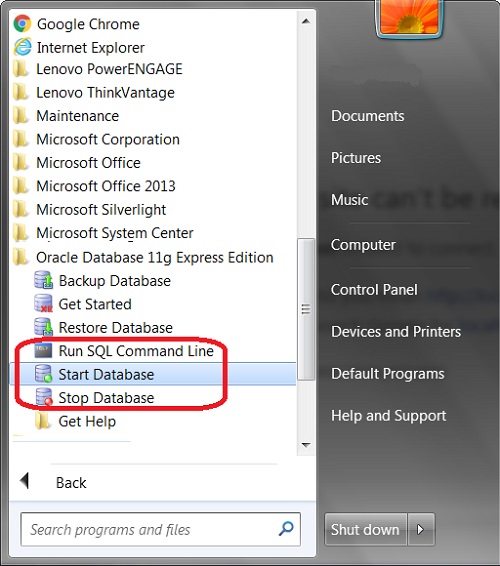
1. Run "Start > All Programs > Oracle Database 11g Express Edition > Start Database" to start Oracle Database XE service.
2. Run "Start > All Programs > Oracle Database 11g Express Edition > Run SQL Command Line" to run a test command:
SQL*Plus: Release 11.2.0.2.0 Production
Copyright (c) 1982, 2014, Oracle.  All rights reserved.

SQL> -- Using Windows user group authentication for now
SQL> CONNECT / AS SYSDBA
Connected.

SQL> COL PRODUCT FORMAT A35
SQL> COL VERSION FORMAT A15
SQL> COL STATUS FORMAT A15
SQL> SELECT * FROM PRODUCT_COMPONENT_VERSION;

PRODUCT                             VERSION     STATUS
----------------------------------- ----------- ----------
NLSRTL                              10.2.0.2.0  Production
Oracle Database 10g Express Edition 10.2.0.2.0  64bit Production
PL/SQL                              10.2.0.2.0  Production
TNS for 64-bit Windows:             10.2.0.2.0  Production
3. Run "Start > All Programs > Oracle Database 11g Express Edition > Stop Database" to stop Oracle Database XE service.
The following picture shows you how to start and stop Oracle Database 11g XE on Windows 7:
⇒ OracleJdbcConnection.java - Oracle JDBC Connection
⇐ Install Oracle Database 11g XE for ojdbc.jar Test
2018-03-28, ∼2593🔥, 0💬

